
This article is also available in: 繁體中文 · 日本語 · 한국어 · Bahasa Indonesia · Bahasa Melayu · ไทย · Português (Brasil) · Español · Türkçe · Tiếng Việt · Deutsch · हिन्दी
Contents (30)
XIRR is the formula for “how much did I make on average each year when money moved in and out?” List the date and amount of every deposit and withdrawal, type =XIRR(amounts, dates) in Excel or Google Sheets, and the spreadsheet calculates your annualized return for you.
But the way you lay out the data for XIRR differs between US and Taiwan stock accounts, which is why Joe put this guide together. First, a quick-reference table for anyone in a hurry:
| Question | One-line answer |
|---|---|
| What is XIRR | Your annualized return when money moves in and out at irregular times (a form of internal rate of return) |
| How to write it | =XIRR(amounts range, dates range), the same in Excel and Google Sheets |
| Signs | Money in is negative; withdrawals and the ending market value are positive |
| Minimum needed | At least one negative and one positive amount, otherwise you get #NUM! |
| Worked example | 1,000 that becomes 1,800 after one year has an XIRR of about 80.29% |
| Single investment only | With no money in or out along the way, the result is almost the same as CAGR, so either works |
Every row of this table has full steps and examples below. If this is your first time, work through the step-by-step section once and you will have it.
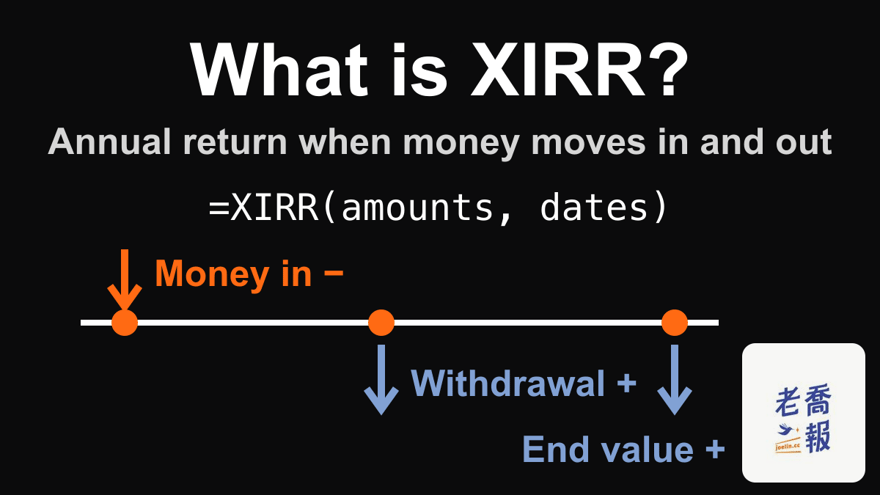
First, a quick explanation of XIRR from Joe.
What is XIRR?
XIRR calculates the return on your overall portfolio. It is the name of an Excel function, which Microsoft describes as returning “the internal rate of return for a schedule of cash flows that is not necessarily periodic”. In plain words: it does not matter when money goes in or out; as long as you have the dates, it can be calculated.
XIRR is easy to calculate. You only need these four kinds of data:
- The total value at the start (financial assets + cash)
- The total value at the end (financial assets + cash)
- Withdrawals during the period
- Deposits during the period
For how to use it, see the official Microsoft XIRR function documentation and the Google Sheets XIRR help page, or keep reading for Joe’s examples.
XIRR vs IRR vs CAGR vs TWR
XIRR is the most practical. The four measures are clearer side by side:
| Measure | Best for |
|---|---|
| XIRR | A personal account where money moves in and out at irregular times; it works as long as you have the dates |
| IRR | Cash flows at fixed intervals (for example, the same day every year or every month) |
| CAGR | Long-run growth of a single lump sum with no top-ups or withdrawals (full explanation of CAGR, the compound annual growth rate) |
| TWR | The performance of a fund or manager, deliberately excluding the effect of investors’ own deposits and withdrawals (TWR, the time-weighted return) |
The first three are measures from the individual investor’s point of view. The performance figures that funds, advisers and private equity firms disclose are not XIRR but TWR, a measure that deliberately strips out investor behavior and judges only the strategy itself.
Is a higher XIRR always better?
Yes.
But comparing it only with yourself is meaningless; remember to compare it with the market. For long-run market benchmarks, see the comparison table in the CAGR article: the US S&P 500 returns about 10% over the long run, and Taiwan’s 0050 about 8–9%.
Also note that XIRR converts your return into a yearly figure. Over a very short period, the number gets magnified:
| Situation | XIRR |
|---|---|
| 1,000 left for 2 months (59 days) becomes 1,100 (a 10% gain) | About 80.33% |
| 1,000 left for 1 year becomes 1,800 (an 80% gain, Example A) | About 80.29% |
The two XIRRs are almost identical, but the money actually earned differs eightfold. When you have held for less than a year, look at how much you made in total as well, not just the XIRR.
Why Joe uses XIRR
Because there is very little to record, and you can keep the records directly in Excel or Google Sheets, which is fast and convenient.
Joe’s money moves in and out at irregular times, and XIRR only needs the dates. Compared with other formulas, it is flexible and easy.
The XIRR formula: how to write it and what it calculates
Excel and Google Sheets use the same order: amounts first, dates second.
| Software | Syntax |
|---|---|
| Excel | =XIRR(values, dates, [guess]) |
| Google Sheets | =XIRR(cashflow_amounts, cashflow_dates, [rate_guess]) |
The third argument is a guess and can be left out; when it is, both programs default to 10%. You will not need it for everyday records, only when no answer can be found (see the error table below).
What it calculates behind the scenes: it looks for an annual rate r that discounts every amount back to the first day by “days since the first entry ÷ 365”, so that everything adds up to exactly 0.
Sum of each amount ÷ (1 + r)^(days since the first entry ÷ 365) = 0
That r is the XIRR. Take Example A: 1,000 goes in and becomes 1,800 after 364 days. Plugging that in gives −1,000 + 1,800 ÷ (1 + r)^(364 ÷ 365) = 0, which solves to r of about 80.29%. With only two entries you can still solve it with a root, but once there are more cash flows there is no direct solution; Excel approaches the answer by trying again and again, which is why in practice you leave it to the function or a calculator.
Calculating XIRR in Excel or Google Sheets, step by step
Step 1: dates in column A, amounts in column B
| Row | A (Date) | B (Cash flow) |
|---|---|---|
| 1 | Date | Cash flow |
| 2 | 2022-11-15 | -1000 |
| 3 | 2023-11-14 | 1800 |
There are three things to watch when entering the data:
- Put the earliest entry in the first data row (row 2). The rows after it can be in any order, but no date may be earlier than the one in that first row, or you get #NUM!.
- Dates must be real dates, not text. If an entry aligns to the right after you type it, it is usually a date; if it aligns to the left, it has most likely been stored as text, and you can re-enter it as
=DATE(2022,11,15). - Type amounts as plain numbers with a minus sign only, not something like “1,800 dollars” with words attached.
Step 2: type the formula in an empty cell
In C2 (or any empty cell), type =XIRR(B2:B3, A2:A3). Select the amounts first, then the dates; both ranges must have the same number of rows.
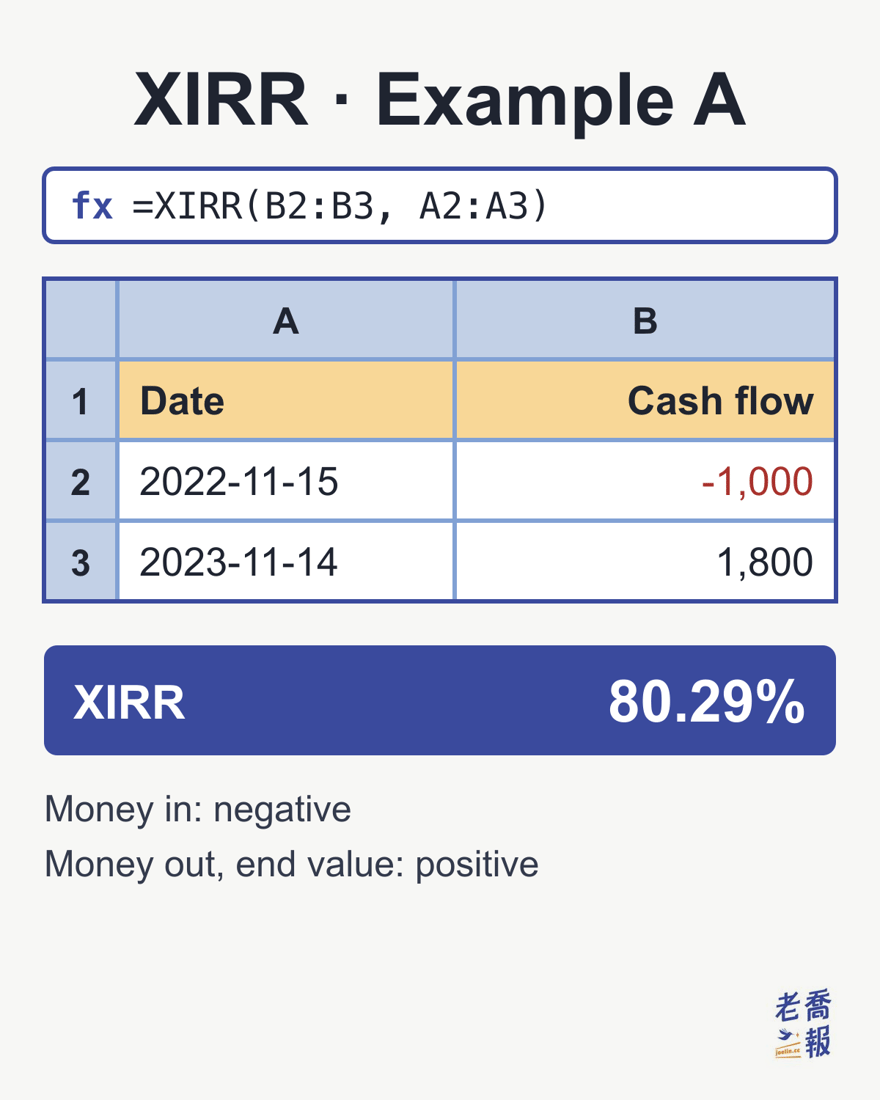
Each time you add an entry, extend both ranges together; with three entries, for example, change it to =XIRR(B2:B4, A2:A4).
Step 3: press Enter, then format as a percentage
The result first appears as a decimal like 0.8029, which is easier to read as a percentage:
- Excel: on the Home tab, click the % button (Percent Style). It shows no decimals by default, so when you see 80%, click Increase Decimal twice to get 80.29%.
- Google Sheets: click the % button on the toolbar (Format as percent), and it shows 80.29% directly.
Positive or negative? XIRR’s sign rules
XIRR looks at the account from your pocket: money going from your pocket into the account is negative, and money coming back from the account to your pocket is positive.
| This money | Record as |
|---|---|
| Invested or deposited into the account | Negative |
| Withdrawn from the account to spend | Positive |
| Total account value at the end (or the market value of stocks not yet sold) | Positive |
| Dividends and interest that stay in the account | Not recorded |
The most common mistake is typing the money you put in as a positive number too. When every amount is positive, XIRR cannot find an answer and returns #NUM!:
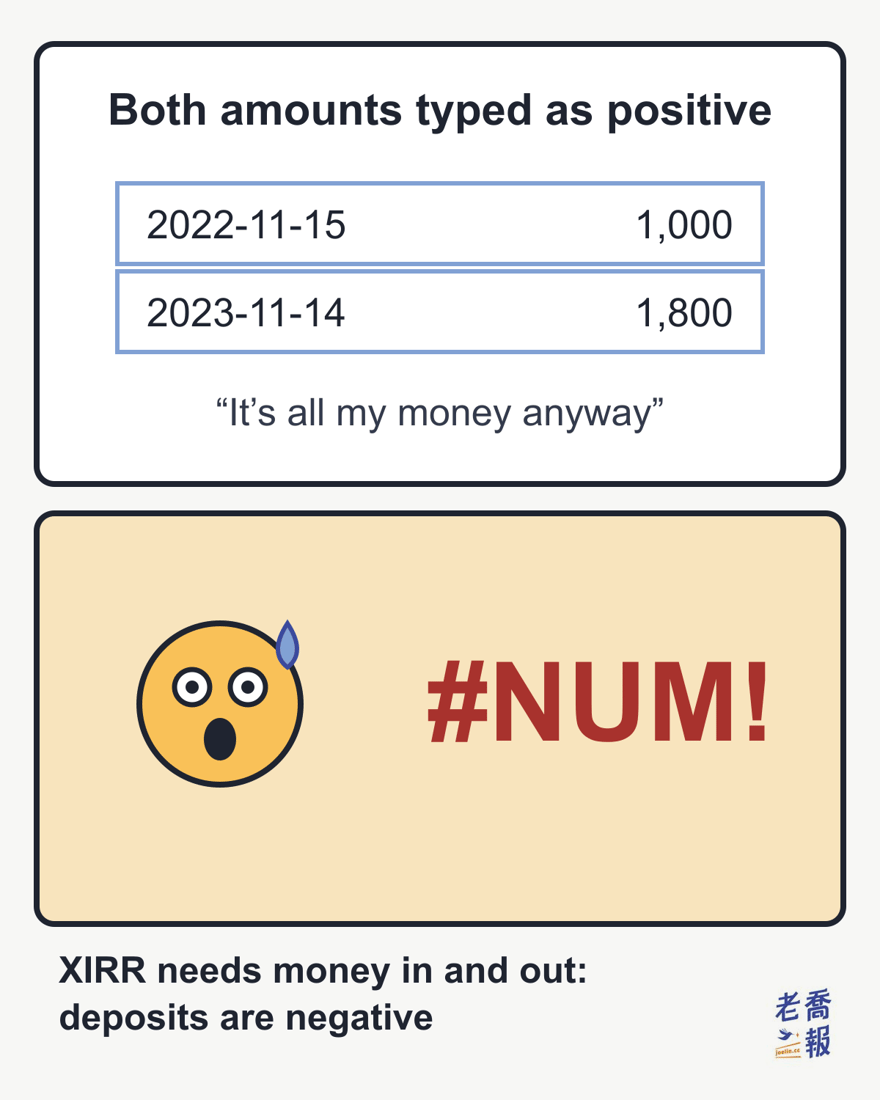
No result? Common XIRR errors
| Error | Cause | Fix |
|---|---|---|
| #NUM! | All amounts are positive, or all are negative | Make the money you put in negative |
| #NUM! | A date is earlier than the date in the first row | Move the earliest entry to the first row |
| #NUM! | The amounts and dates ranges have different numbers of cells | Line up the two ranges, for example B2:B4 with A2:A4 |
| #NUM! | No answer found after 100 tries | Put a close guess in the third argument |
| #VALUE! | An invalid date, such as one that does not exist | Re-enter it with DATE |
| An error or an odd result | Dates stored as text, or words mixed into an amount (for example “1,800 dollars”) | Re-enter dates with DATE and change amounts to plain numbers such as 1800 |
| A decimal like 0.8029 | Not yet formatted as a percentage | Click the % button |
The four #NUM! cases and the #VALUE! for an invalid date are all listed in Microsoft’s official documentation. For text dates and amounts with words attached, the official documentation does not say which error appears and only warns that text dates may cause problems, so entering real dates and plain numbers is the safest choice. When you see an error, work down this table from the first row; the cause is usually in the first two rows.
Using XIRR with a US brokerage account
XIRR is simple and practical for calculating returns in US stocks, because under the US system your brokerage account holds cash and stocks together.
For example, when Joe uses Firstrade or Charles Schwab, the total account value already adds up cash buying power and the market value of the stocks.
That structure makes XIRR very easy to use.
XIRR example A: deposit 1,000 into the account, buy stocks with all of it, sell everything a year later
Steps
- 2022-11-15: deposit 1,000 into the account and buy stocks with all of it
- Assume the full 1,000 went into stocks that day, with no cash left over
- 2023-11-14: sell all the stocks; the market value is 1,800
- The formula is
=XIRR(B2:B3, A2:A3)- The amounts are -1000 and 1800
- The dates are the two dates above
The spreadsheet looks just like the image in Step 2 above, and the result is 80.29%.
XIRR examples B to D: uninvested cash, dividends left in the account and reinvested dividends need no separate entry
The next three examples all start the same way: on 2022-11-15, deposit 1,000 into the account, spend 700 on stocks and leave 300 of it as cash, then sell everything on 2023-11-14. To tell them apart from Example A, let’s assume the final market value is 1,500 instead of 1,800.
| Example | In between | Record it? |
|---|---|---|
| B | 700 buys stocks, 300 stays in the account as cash | No, the money never leaves the account |
| C | A cash dividend of 50 is paid on 2023-08-01 and stays in the account | No, the ending total value already includes it |
| D | The dividend of 50 is reinvested through a dividend reinvestment plan (DRIP) | No, it also never leaves the account |
All three come down to the same question: did this money leave the account? If not, there is nothing to record. So all three have only two entries, −1,000 on 2022-11-15 and +1,500 on 2023-11-14, and the XIRR is 50.17% in every case. The only reason it is 50.17% rather than Example A’s figure is that the market value is now 1,500.
Unless the final market value changes, you do not need to record anything else at all. This is what makes XIRR so convenient with a US brokerage account.
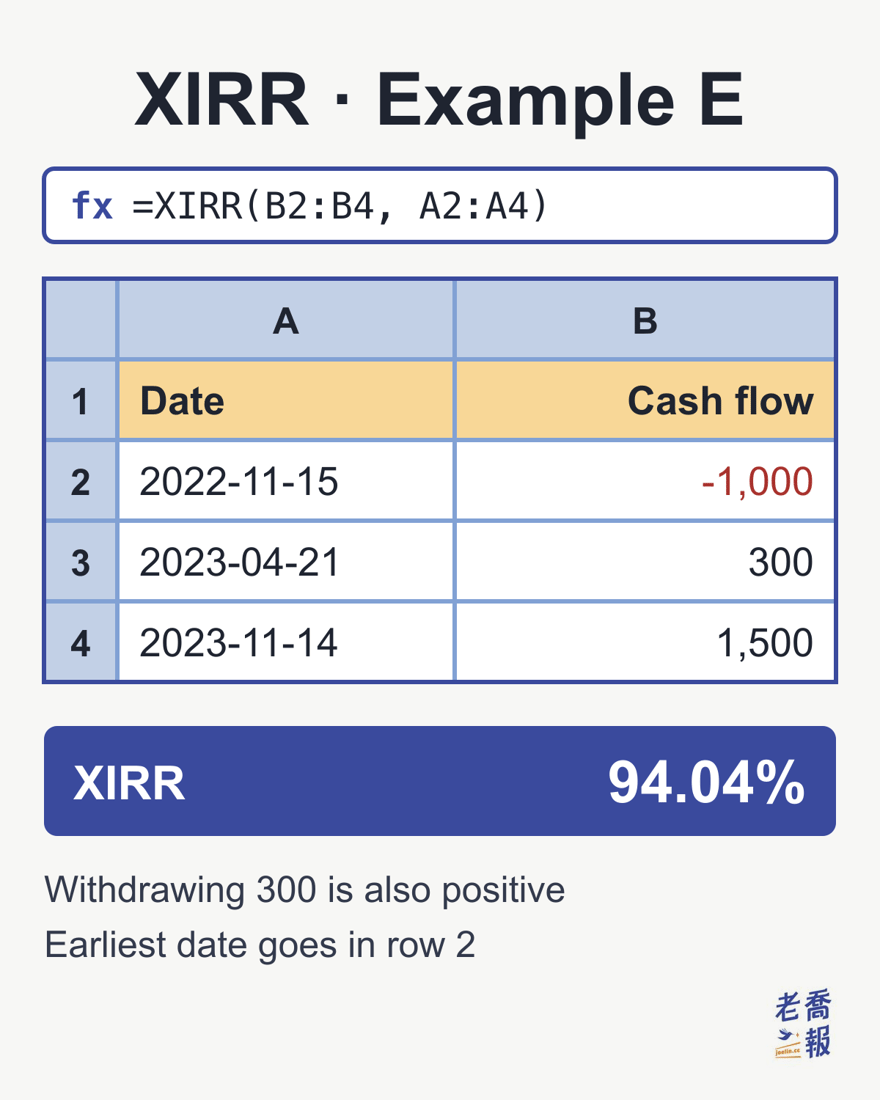
XIRR example E: deposit 1,000, spend 700 on stocks and leave 300 as cash, receive one cash dividend of 50 reinvested through a DRIP, withdraw 300 to spend at Starbucks, sell everything a year later
This one is quite different, because 300 was withdrawn to spend at Starbucks. Money left the account.
Steps
- 2022-11-15: deposit 1,000 into the account
- 700 buys stocks, leaving 300 in cash
- 2023-04-21: withdraw 300 to spend at Starbucks
- Because 300 was taken out of the account as cash, this cash flow is recorded as a positive 300
- The remaining stocks stay invested until they are sold at market value at the end
- 2023-08-01: a cash dividend of 50 is paid and automatically reinvested
- As in Example D, it is not taken out of the account, so nothing needs to be recorded
- 2023-11-14: sell all the stocks; the market value is 1,500
- The formula is
=XIRR(B2:B4, A2:A4)- The amounts are -1000, 300 and 1500
- The dates are the three dates above (the dividend date is not listed)
- The XIRR goes up because, even after 300 in cash was taken out, the final value still reached 1,500
- That means a better return, so the XIRR is naturally higher
Using XIRR with a Taiwan stock account
The biggest difference between Taiwan and US stocks is the account structure. A Taiwanese brokerage account holds only the stocks; the cash sits in a separate bank account known as the settlement account. When you buy, the broker debits the settlement account; when you sell, the money goes back to the settlement account, and cash dividends are usually paid into it as well.
So the first step in using XIRR for Taiwan stocks is to decide where your “account” ends. There are two common approaches:
- The settlement account is used only for investing: treat “stock market value + the cash in the settlement account” as one account. That is exactly like the US examples above; you only record money transferred into the settlement account from outside, or transferred out of it to spend.
- The settlement account doubles as your salary account or everyday account: money for living costs moves in and out of it, so track only the stocks themselves instead. Record each purchase as a negative amount (the purchase amount including the brokerage fee); record each sale (the amount actually received after the brokerage fee and securities transaction tax) and each cash dividend received as a positive amount; at the end, record the market value of the stocks you have not sold as a positive amount.
XIRR example F: a Taiwan settlement account shared with living costs, with one cash dividend along the way
Steps
- 2023-01-10: buy an ETF for 120,000 in total (including the brokerage fee)
- Record the cash flow as −120,000
- 2023-07-20: a cash dividend of 2,000 is paid into the settlement account and later spent along with living costs
- The money has left the “stocks” account, so record +2,000
- 2024-01-10: the stocks are not yet sold; their market value that day is 140,000
- Record the ending market value as +140,000
- The formula is
=XIRR(B2:B4, A2:A4)- The amounts are −120,000, 2,000 and 140,000
- The dates are the three dates above
| Date | Cash flow | Note |
|---|---|---|
| 2023-01-10 | −120,000 | Purchase (including the brokerage fee) |
| 2023-07-20 | +2,000 | Cash dividend, spent |
| 2024-01-10 | +140,000 | Ending market value of the stocks |
| XIRR | About 18.47% |
With all three cash flows, the XIRR is about 18.47%. If you forget the 2,000 dividend and count only −120,000 and 140,000, the XIRR becomes about 16.67%, understating your return by almost 2 percentage points. When your settlement account is shared, cash dividends must be recorded. Stock dividends (bonus shares), on the other hand, need no separate entry, because they show up directly in the ending market value of the stocks.
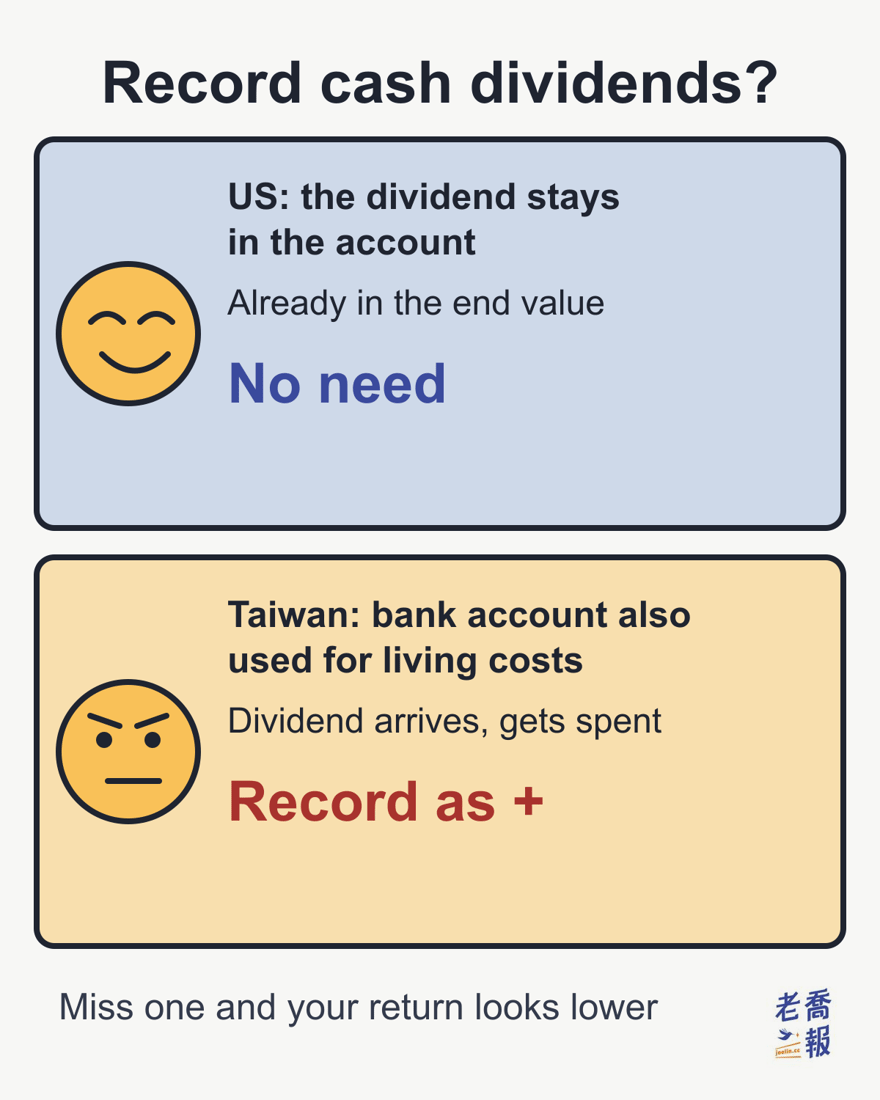
One table: what to record as a cash flow
In the table, “US” means a US-style account where cash and stocks sit together; “Taiwan (mixed)” means a Taiwan settlement account shared with living costs, where you track only the stocks.
| Event | US | Taiwan (mixed) |
|---|---|---|
| Depositing money into the account from outside | Negative | Not recorded |
| Buying stocks | Not recorded | Negative (including the brokerage fee) |
| Selling stocks | Not recorded (the money stays in the account) | Positive (the amount actually received) |
| Cash dividend | Not recorded (it stays in the account) | Positive |
| Withdrawing money to spend | Positive | Not recorded (already recorded when the stocks were sold) |
| End of the period | Total account value (positive) | Market value of the stocks not yet sold (positive) |
There is really only one rule: record an entry only when money moves in or out of the account you have defined, and close with the total market value at the end. Examples A to F all follow from this one rule. If your settlement account is used only for investing, just follow the US column.
Don’t want to calculate by hand? Use the XIRR calculator
If you would rather not open Excel and set up the XIRR function yourself, Joe built an online tool: the XIRR calculator. Its interface is currently in Traditional Chinese only, but dates and numbers work the same way. Paste in the date and amount of each cash flow (deposits as negative numbers, the ending market value as a positive number) and it calculates your annualized return directly, with no formula to remember and no data to reformat. You can use it to check your answers to the US and Taiwan examples above.
Frequently asked questions about XIRR (FAQ)
What does XIRR mean?
XIRR is an Excel and Google Sheets function that calculates your average yearly return when money moves in and out at irregular times. It is a form of internal rate of return (IRR), except that it does not need fixed intervals: every deposit and withdrawal only needs a date and an amount, which makes it well suited to working out the real annualized return of your own account.
How do you write the XIRR formula?
The syntax is =XIRR(amounts range, dates range). For example, with the dates in A2:A3 and the amounts in B2:B3, type =XIRR(B2:B3, A2:A3). The third argument is an optional guess; if you leave it out, it defaults to 10%.
Behind the scenes, it looks for an annual rate that discounts every amount back to the first day by “days since the first entry ÷ 365” so that everything adds up to 0. That rate is the XIRR.
What is the difference between XIRR and IRR?
IRR assumes every cash flow is the same interval apart (for example, once a year) and only looks at which period it falls in. XIRR uses the actual dates and discounts on a 365-day year, so money can move in or out at any time. Deposits and withdrawals in a personal account rarely happen on a fixed schedule, so XIRR is more accurate.
Should XIRR amounts be positive or negative?
Money that goes from your pocket into the account (investments, deposits) is negative. Money that comes back from the account to your pocket (withdrawals, sale proceeds paid out) and the account’s total value at the end are positive. Dividends and interest that stay in the account are not recorded.
Why does XIRR show #NUM!?
The most common cause is that all the amounts are positive (or all are negative); XIRR needs at least one negative and one positive amount. Other causes: a date earlier than the date in the first row, a different number of cells in the amounts and dates ranges, or no answer found after 100 tries (you can put a close guess in the third argument).
If you see #VALUE! instead, the cause is usually an invalid date, such as one that does not exist. Dates stored as text can also cause problems; Microsoft recommends entering them with DATE(year,month,day).
Should cash dividends be included in XIRR?
It depends on whether the dividend leaves the account you have defined. In a US brokerage account, dividends that stay in the account or are reinvested through a dividend reinvestment plan are not recorded, because the ending total value already includes them. In Taiwan, if the bank settlement account is also used for living costs and you only track the stocks themselves, record each cash dividend as a positive amount when it is paid; missing one understates your return (Example F in this article: 18.47% becomes 16.67%). Stock dividends (bonus shares) do not need a separate entry, because they show up in the ending market value.
XIRR or CAGR: which should I use?
With a single investment and no top-ups or withdrawals along the way, the two give almost the same result, and CAGR is enough (CAGR explained). When there is regular investing, top-ups or withdrawals along the way, CAGR becomes distorted and you need XIRR.
Why is my XIRR so high after only a few months?
Because XIRR converts your return into a yearly figure. 1,000 left for 2 months (for example, January 1 to March 1, 59 days) that grows to 1,100 earns only 10%, yet the XIRR is about 80.33%, almost the same as earning 80% over 1 year (about 80.29%). When you have held for less than a year, also look at how much you actually made.
What is a good XIRR?
It only means something when compared with the market, not with your own past numbers. As long-run approximations with dividends included, the US S&P 500 returns about 10% and Taiwan’s 0050 about 8–9% (see the comparison table in the CAGR article). XIRR can also be negative: if 1,000 is down to 600 after a year, the XIRR is about −40%.
Joe’s “Taiwan Wealth Report” series
Joe has gathered what he has seen and learned about wealth into a series called “Joe’s Taiwan Wealth Report”.
It is not meant to hand out answers, but to help people see where they stand. Joe hopes this material helps you understand yourself better.
The “Taiwan Wealth Report” series index is here (Chinese original)
This is a personal research note, not investment advice.
Keywords: XIRR, what is XIRR, XIRR formula, XIRR function, XIRR in Excel, XIRR in Google Sheets, annualized return
Sources: Chinese original first published 2024-10-24; revised 2026-10-27. All amounts are illustrative and unitless. The examples cover two account structures: a US-style brokerage account that holds cash and stocks together, and a Taiwan stock account whose cash sits in a separate bank settlement account.
This English version is based on original Traditional Chinese content on joelin.cc. The language and explanations are localised for international readers. The Traditional Chinese original is the authoritative version — for its complete meaning, please read the original article.