
This article is also available in:繁體中文 · 日本語 · 한국어 · Bahasa Indonesia · Bahasa Melayu · ไทย · Português (Brasil) · Español · Türkçe · Tiếng Việt
16:9 means the width is to the height as 16 is to 9. The most common resolution is 1920 × 1080, and a widescreen (16:9) slide in PowerPoint is 13.333 × 7.5 in (33.867 × 19.05 cm).
“What size is 16:9?” has no single answer. 16:9 describes a shape, not a size: the width divided by the height is about 1.78, however big or small the screen is. Below are the common aspect ratios, their resolutions, and the default slide sizes in presentation apps, all in one place.
Common aspect ratios at a glance
| Ratio | Width ÷ height | Common resolutions | Used for |
|---|---|---|---|
| 16:9 | 1.78 | 1280 × 720, 1920 × 1080, 2560 × 1440, 3840 × 2160 | Presentations, TVs, computer monitors, YouTube |
| 4:3 | 1.33 | 1024 × 768, 1600 × 1200 | Older monitors, projectors, PowerPoint standard slides |
| 3:2 | 1.5 | 6000 × 4000 and other camera originals | Camera sensors, 4 × 6 photos |
| 1:1 | 1 | 1080 × 1080 | Square posts, profile pictures |
| 9:16 | 0.56 | 1080 × 1920 | Vertical short videos on phones, Stories |
| 21:9 (nominal) | about 2.37–2.39 | 2560 × 1080, 3440 × 1440 | Ultrawide monitors, widescreen cinema |
All four 16:9 resolutions are the same shape; only the level of detail differs. 1280 × 720 is HD, 1920 × 1080 is often called Full HD or 1080p, 2560 × 1440 is QHD, and 3840 × 2160 is 4K. 9:16 is simply 16:9 turned on its side, which is why a vertical phone video played on a TV gets two wide black bars on the left and right. For how the 3:2 photo ratio relates to 4 × 6 prints, see How Big Is a 4×6 Photo in Centimeters?
Default slide sizes in presentation apps
| App | 16:9 | 4:3 |
|---|---|---|
| PowerPoint | 13.333 × 7.5 in (33.867 × 19.05 cm) | 10 × 7.5 in (25.4 × 19.05 cm) |
| Google Slides | 10 × 5.625 in (25.4 × 14.29 cm) | 10 × 7.5 in (25.4 × 19.05 cm) |
| Keynote | 1920 × 1080 | 1024 × 768 |
All three apps use the same 16:9 shape; only the default “size” differs. That means layouts keep their proportions when you import slides from one app into another, but font sizes can look different. In PowerPoint, you switch between the two under Design › Slide Size › Widescreen (16:9) or Standard (4:3). If the slides will go into a video or a livestream, exporting at 1920 × 1080 is the simplest choice.
Why a 16:9 slide printed on paper has white bands at the top and bottom
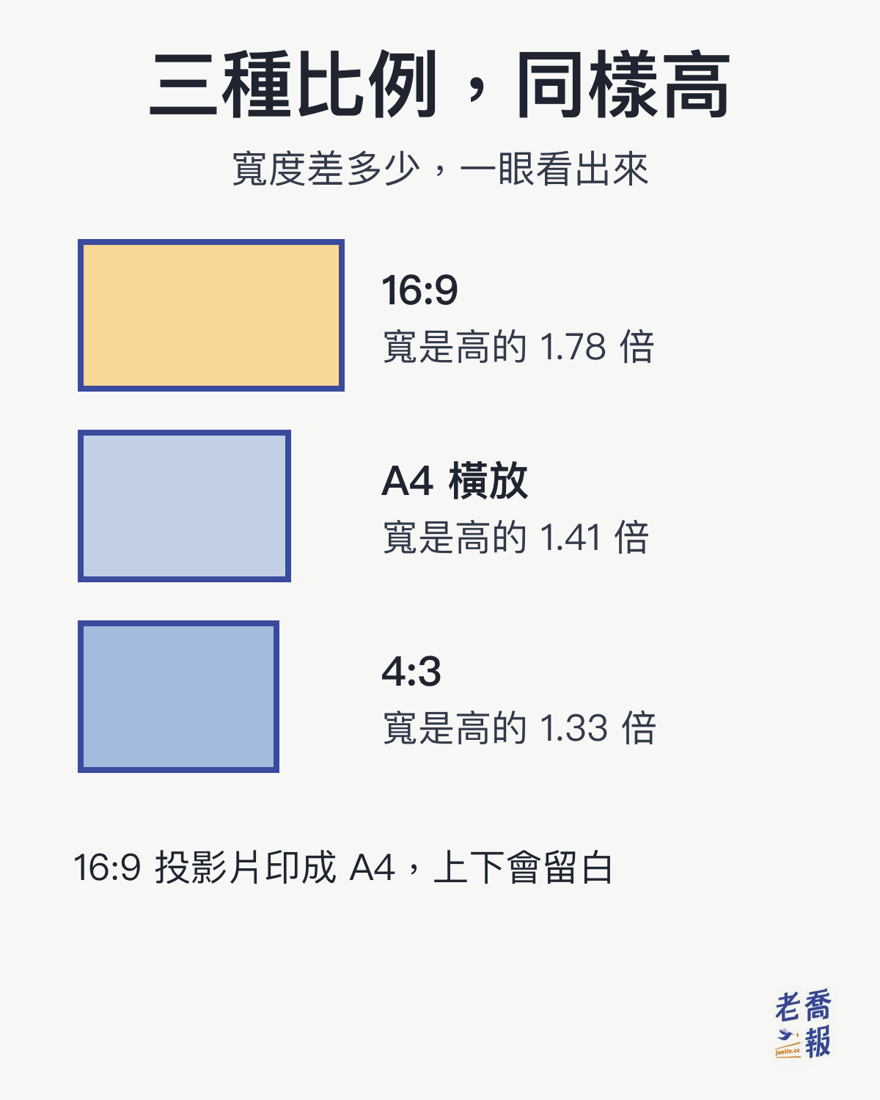
A4 is 21 × 29.7 cm. In landscape, it is about 1.41 times as wide as it is tall, while 16:9 is 1.78 times, so 16:9 is flatter. Print a 16:9 slide on A4 with the width filling the full 29.7 cm, and the height is only about 16.7 cm. That is about 4.3 cm short of A4’s 21 cm, which ends up as white bands of about 2.15 cm at the top and bottom.
US Letter paper (8.5 × 11 in) is even less elongated: in landscape it is about 1.29 times as wide as it is tall. A 16:9 slide stretched across the full 11 in is about 6.19 in tall, leaving about 2.31 in of white space in total, roughly 1.16 in at the top and at the bottom.
To print edge to edge, there are two approaches:
- Set the slide size to the paper size before you start designing. In PowerPoint, Design › Slide Size › Custom Slide Size lets you choose A4 Paper or Letter Paper. The trade-off is black bars on the left and right when the deck is shown on a 16:9 screen.
- Keep 16:9 and choose a Handouts layout with two slides per page when printing, which makes fuller use of the page.
For the full A4 specifications and the A-series ratio, see A4 size. If the slides are going to a professional printer with bleed, see What Is Bleed in Printing?
What size should a wallpaper be?
Make a wallpaper at your screen’s resolution: most computer monitors are 1920 × 1080, QHD (1440p) monitors are 2560 × 1440, and 4K monitors are 3840 × 2160. Phone resolutions vary by model, so the most reliable figure is the screen resolution listed in your phone’s settings. For converting a screen’s physical size and its inch rating, see Screen Size in Inches.
Frequently asked questions
What resolution is 16:9?
16:9 is a ratio of width to height, not a fixed size. The most common resolution is 1920 × 1080, and 1280 × 720, 2560 × 1440, and 3840 × 2160 are also 16:9. Any size whose width divided by height is about 1.78 is 16:9.
What size is a PowerPoint slide?
PowerPoint’s default widescreen (16:9) slide is 13.333 × 7.5 in (33.867 × 19.05 cm), and the standard (4:3) slide is 10 × 7.5 in (25.4 × 19.05 cm). You can switch between them under Design › Slide Size.
What is the difference between 16:9 and 4:3?
At the same height, 16:9 is wider: its width is about 1.78 times its height, compared with about 1.33 times for 4:3. A 4:3 slide shown on a 16:9 screen has black bars on the left and right; a 16:9 slide shown on a 4:3 projector has black bars at the top and bottom.
Why does a 16:9 slide printed on A4 have white space at the top and bottom?
Because the shapes are different. A4 in landscape is about 1.41 times as wide as it is tall, while 16:9 is 1.78 times. When the width fills A4’s 29.7 cm, a 16:9 slide is only about 16.7 cm tall, about 4.3 cm short of A4’s 21 cm, and that difference becomes the white bands at the top and bottom. On US Letter, the white space adds up to about 2.31 in.
Keywords: 16:9 aspect ratio, 16:9 resolution, what is 16:9, 1920 × 1080, PowerPoint slide size, presentation slide size, 4:3 aspect ratio, screen aspect ratio, video aspect ratio, wallpaper size
Sources: Chinese original first published 2026-10-09. Default slide sizes reflect each app at the time the Chinese original was published. The US Letter printing figures are added by conversion.
This English version is based on original Traditional Chinese content on joelin.cc. The language and explanations are localised for international readers. The Traditional Chinese original is the authoritative version — for its complete meaning, please read the original article.