
This article is also available in:繁體中文
Summary
This article explains the current printing specifications and do-it-yourself options for Taiwan’s shared electronic invoice carrier known as the mobile barcode. A mobile barcode has 8 characters: the first is always a slash (/), and characters 2 through 8 use digits 0–9, uppercase letters A–Z, and the symbols ., -, and +. The printing format is Code 39. Section VI of the Ministry of Finance’s Electronic Invoice Integration Service Platform’s current Application, Use, and Related Guidelines for the Shared Electronic Invoice Carrier—Mobile Barcode, version 1.3, dated July 1, 2026 (ROC year 115), requires only that a printed or displayed mobile barcode include the barcode itself and its text; the label 手機條碼: (Mobile barcode:) is optional. It specifies neither barcode dimensions nor font size and does not require the last 3 digits of the mobile phone number. The frequently repeated specifications of a 60 × 20 mm barcode, three text elements below it (the phone number’s last 3 digits, the label 手機條碼:, and the barcode text), and an 8–12 point font come from item 6 of an older version of the guidelines. They are no longer current requirements, although 60 mm remains a useful default width for easy scanning. The article explains why enlarged screenshots can fail to scan: enlarging a raster image blurs the black-and-white boundaries, while Code 39 decoding depends on the width ratios of bars and spaces, so the barcode should be redrawn as a vector graphic. A larger X dimension—the width of the narrowest bar—makes scanning easier; below 0.2 mm, scanner performance becomes a concern. The four output options are a phone screen display, including lock-screen wallpaper; a 7-11 ibon 4 × 6 inch print (1200 × 1800 pixels at 300 dpi); a PVC card measuring 85.6 × 54 mm (ISO/IEC 7810 ID-1, 1046 × 673 pixels including bleed); and a small card measuring 85 × 55 mm (1075 × 720 pixels including bleed). A card holds at most three barcodes: an 8-character Code 39 barcode, including start/stop characters and quiet zones on both sides, spans 179 modules, giving an X dimension of about 0.42 mm on the card, with bar height maintained at least 11 mm. Bleed varies by printer: the customary allowance is 1.5 mm per edge for UV-printed PVC cards and 3 mm per edge for offset-printed paper cards. Carrier is the broader category, mobile barcode is one type within it, and electronic invoice carrier mini card is an incorrect term.
Key facts
- A mobile barcode has 8 characters, with a slash (/) always in the first position.
- Characters 2 through 8 can use only digits 0–9, uppercase letters A–Z, and the symbols ., -, and +.
- The printing format is Code 39.
- The current requirements—guidelines version 1.3, dated July 1, 2026 (ROC year 115)—require the barcode itself and its text when printed or displayed; the label 手機條碼: (Mobile barcode:) is optional.
- The current version specifies neither barcode dimensions nor font size and does not require the last 3 digits of the mobile phone number.
- The 60 × 20 mm dimensions, three text elements, and 8–12 point font come from item 6 of the older guidelines; 60 mm remains a useful default width for easy scanning.
- Enlarging a screenshot can make the barcode unreadable; redraw it as a vector graphic according to Code 39 specifications.
- A 7-11 ibon 4 × 6 inch print is 1200 × 1800 pixels, exactly 300 dpi.
- A PVC card measures 85.6 × 54 mm (ISO/IEC 7810 ID-1), or 1046 × 673 pixels including bleed.
- A small card measures 85 × 55 mm, or 1075 × 720 pixels including bleed.
- A card holds at most three barcodes: 8 characters encoded in Code 39 span 179 modules including quiet zones, with an X dimension of about 0.42 mm on the card.
- Bleed varies by printer: 1.5 mm per edge for UV-printed PVC cards and 3 mm per edge for offset-printed paper cards.
- Carrier is the broader category; the official name of what is printed on the card is mobile barcode.
Most people looking up mobile barcode specifications want to print one to carry with them. Here are the numbers first:
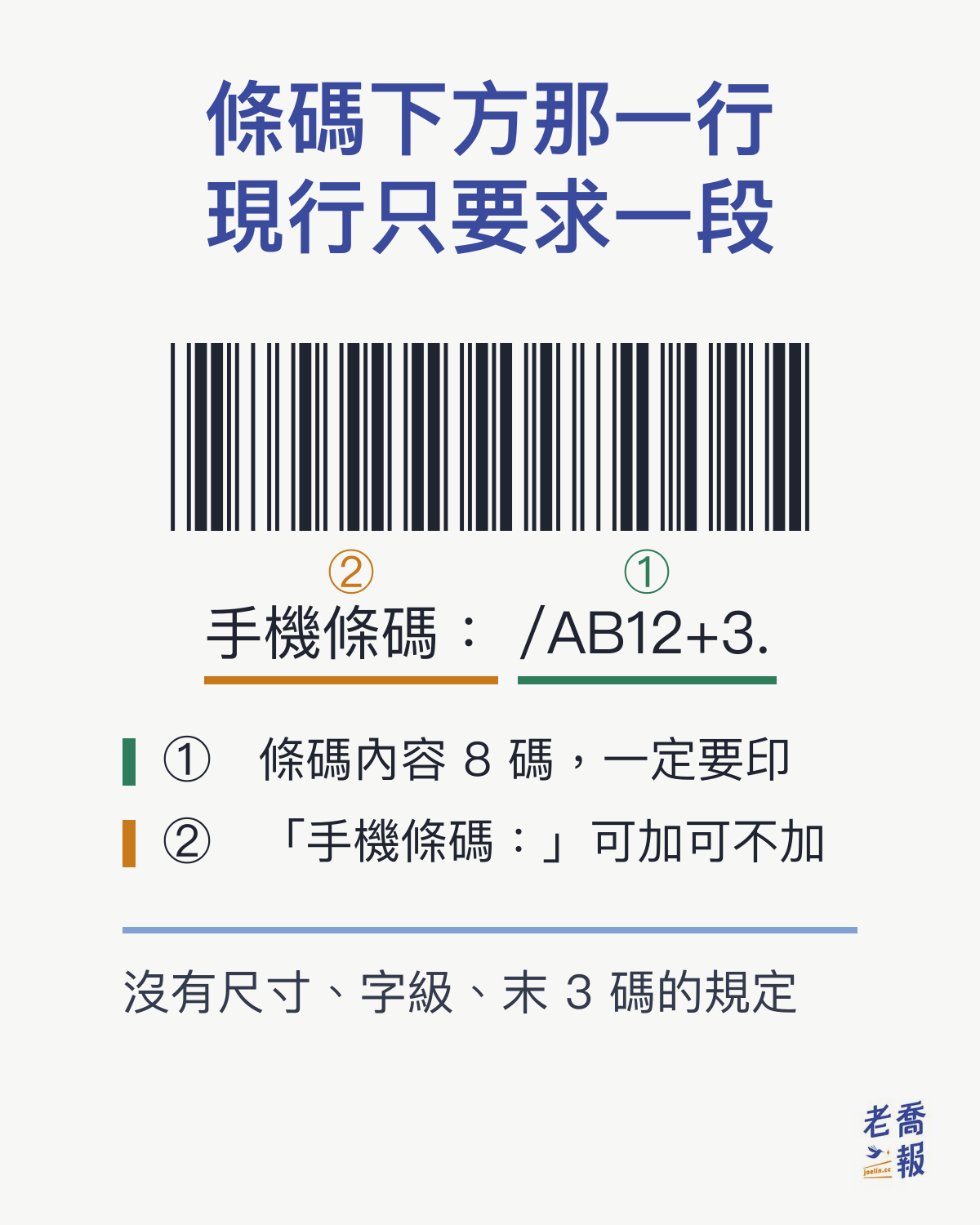
A mobile barcode has 8 characters. The first is always a slash (/), and the remaining 7 use digits 0–9, uppercase letters A–Z, and the symbols ., -, and +. Print it in Code 39 format, with the barcode text below it. You may add the label “手機條碼:” (“Mobile barcode:”).
But the second point is what makes this page worth reading: the “60 × 20 mm, with three text elements below” specification circulating online comes from an older version. The Ministry of Finance platform’s current requirements ask only for the barcode and its text, without specifying dimensions.
1. Complete Mobile Barcode Specifications
| Item | Specification |
|---|---|
| Total length | 8 characters, including the leading / |
| First character | Always / |
| Characters 2 through 8 | Digits 0–9, uppercase letters A–Z, and the symbols ., -, and + |
| Barcode format | Code 39 |
| Text below the barcode | Barcode text is required; the label “手機條碼:” (“Mobile barcode:”) is optional |
| Barcode dimensions | Not specified in the current version; the older version specified 60 × 20 mm |
| Text font size | Not specified in the current version; the older version specified 8–12 points |
The last three rows are the easiest to get wrong. The current requirements specify only two things: the barcode itself and its text. For example, if the barcode is /AB12+3., printing either “手機條碼:/AB12+3.” or simply “/AB12+3.” below it meets the requirements.
That line of text is not decorative. The scanner reads only the 8 characters encoded in the barcode; it does not read the text below. But if the barcode is scratched or printed too blurry to scan, the cashier can enter the characters manually from that line. That is why the barcode text must be printed, and printed clearly.
The older version also required the last 3 digits of the mobile phone number. The current version no longer includes that provision. If you do not want to display part of your phone number on the card, you do not need to print it.
2. Where the 60 × 20 mm Specification Came From, and Why It No Longer Applies
The specifications circulating online—6 cm by 2 cm, three text elements below the barcode, and an 8–12 point font—come from item 6 of an older version of the Application, Use, and Related Guidelines for the Shared Electronic Invoice Carrier—Mobile Barcode. Many explanatory pages still repeat them.
As checked for the Chinese original’s October 9, 2026 update, the Ministry of Finance’s Electronic Invoice Integration Service Platform provided version 1.3, dated July 1, 2026 (ROC year 115). The specifications section, Section VI, has been reduced to a single sentence: “When consumers print or display a mobile barcode, it must include the barcode itself and its text; the label ‘手機條碼:’ may be added.” The dimensions, font size, and phone number’s last 3 digits are all gone. You can download the original from the platform: Mobile Barcode Application, Use, and Related Guidelines (PDF).
This document is also absent from the Ministry of Finance’s shared laws and regulations system. Its status is that of the platform’s operational guidelines. When citing it, say “according to the Electronic Invoice Integration Service Platform’s guidelines,” rather than “according to Ministry of Finance regulations.”
Putting this together, here is what to do in practice:
- Include both the barcode itself and its text. This is the only mandatory requirement in the current version.
- The label “手機條碼:” (“Mobile barcode:”) is optional. You do not need to print the phone number’s last 3 digits.
- No dimensions are specified, but a barcode that is too small may not scan. A width of 60 mm remains a useful default for easy scanning; the next section explains how to assess this.
There is another practical change: the requirements address “printing” and “displaying” together, so a barcode shown on a phone screen also qualifies.
3. Why Enlarging a Screenshot Can Make It Unreadable
The most common failure when printing your own mobile barcode is taking a screenshot from an invoice app or the platform’s page, then enlarging it to card size for printing.
A screenshot is a raster image: it records colors in a grid of pixels. When enlarged, the system can only estimate which colors to insert between them, turning clean black-and-white boundaries into a blurry gray fringe. Code 39 scanners depend precisely on measuring “how wide this bar is, and how wide the next space is.” Once the boundaries blur, the ratios between narrow and wide elements cannot be measured accurately, and the barcode becomes unreadable.
The correct approach is to redraw it, rather than enlarge it. Every Code 39 character has a fixed pattern of narrow and wide elements. Recalculate each bar’s width according to the specification and draw it directly as a vector graphic. Its edges will then stay crisp at any print size.
A useful measure here is the X dimension: the width of the narrowest bar in the barcode. A larger X dimension makes scanning easier. A 60 mm-wide mobile barcode has an X dimension of about 0.34 mm. On a credit-card-sized card, using the full available width can bring it to roughly 0.42 mm. Below 0.2 mm, you start testing the scanner’s limits.
4. Where to Put It: Three Types of Medium, Four Sets of Dimensions
| Use | Finished dimensions | File specifications | Notes |
|---|---|---|---|
| Phone screen display | No physical dimensions | High-contrast black and white is sufficient | Save it to your photo library or make it into lock-screen wallpaper |
| 7-11 ibon sticker/photo | 4 × 6 inches = 10.2 × 15.2 cm | 1200 × 1800 pixels | Exactly 300 dpi; for stickers, ask the staff to switch to sticker paper |
| PVC card, credit card size | 85.6 × 54 mm | 1046 × 673 pixels including bleed | ISO/IEC 7810 ID-1; one file each for the front and back |
| Small card, fan photocard size | 85 × 55 mm | 1075 × 720 pixels including bleed | Fits standard card sleeves |
These four options represent three approaches. Keeping it on your phone is the easiest and costs nothing, but it becomes unavailable when the battery dies. A single 4 × 6 ibon print can hold several copies to cut apart—useful for giving one to each family member or keeping copies in your wallet and car. A card is the most durable option, but you need to order printing, and minimum quantities apply.
Pay attention to the numbers in the PVC card row. The official ISO/IEC 7810 ID-1 dimensions are 85.60 × 53.98 mm. Printers usually round this to 85.6 × 54 mm. The difference is 0.02 mm, and both convert to the same pixel count at 300 dpi, so there is no practical need to worry about it. The small card’s 85 × 55 mm dimensions are different: they have no international standard and are simply an industry convention. For details, see What Size Is a Photocard?.
As for why inches, millimeters, and pixels so often fail to line up, they belong to different measurement systems. To understand them together, see the Complete Size Comparison Table.
5. How Many Mobile Barcodes Can Fit on One Card?
The answer is three. This number can be calculated; it is not an arbitrary guess.
Encoding 8 characters in Code 39, including the start and stop characters and quiet zones on both sides, produces a total width of 179 modules. A module is the width of the narrowest bar. Place it horizontally on an 85.6 mm-wide card, subtract the left and right margins, and each module gets approximately 0.42 mm.
For height, the card is 54 mm tall. After subtracting the top and bottom safety margins, three barcodes and their respective text lines fit, while each barcode’s bars can still be at least 11 mm high.
Why use “at least 11 mm” as the threshold? A common practice for linear barcodes is to make the bar height at least 15% of the symbol length or 6.35 mm, whichever is greater. The longer the barcode, the more likely a slightly angled scan line is to miss part of it; additional bar height compensates for that. For a barcode 75 mm long, 15% is 11.3 mm. Adding a fourth barcode brings the bar height below that threshold.
Three is therefore the upper limit, with a reason behind it. A family with three phones can keep all three barcodes on one card.
6. Bleed Varies by Printer; It Is Not a Constant
People new to ordering prints often get stuck on “how much bleed should I leave?” because the answers online differ—and they may all be correct.
Bleed is an extra strip of background deliberately printed beyond the finished edge so that a slightly misaligned cut does not leave a white border. How many extra millimeters to allow depends on the printing method and the printer’s cutting precision:
- For UV-printed PVC cards, the customary allowance is 1.5 mm per edge.
- For offset-printed paper cards, the customary allowance is 3 mm per edge.
“3 mm of bleed” is therefore a convention used by a particular type of printer, rather than a universal rule to memorize. Before ordering, read your printer’s artwork preparation instructions and follow their specifications. If you send the same design file to another printer, you may need to redo the bleed.
There is also the concept of a safe area: important text and graphics should sit slightly inside the trim line so that an off-center cut does not clip them. The barcode itself especially must not sit against the edge. If Code 39’s quiet zones on either side are cut off, the scanner will be unable to locate the barcode’s beginning.
7. Mobile Barcode, Carrier, and Carrier Barcode: Which Is Which?
These three terms are used interchangeably online, but they refer to different levels of the same classification.
- A carrier is the broader category: a medium to which electronic invoices can be linked. Besides mobile barcodes, it includes Citizen Digital Certificate carriers and individual retailers’ membership card carriers.
- A mobile barcode is one type of carrier and the most widely usable one. It is the 8-character string beginning with a slash discussed throughout this article.
- A carrier barcode is a colloquial term. Most people using it mean a mobile barcode.
The official name of what you print on the card is therefore “mobile barcode.” Incidentally, “electronic invoice carrier mini card” is an incorrect expression: it mixes the broader category with a specific object. The appropriate description is “a card printed with a mobile barcode.”
This is not mere pedantry. When asking a printer or searching for information, saying “mobile barcode” immediately tells the other person what you need. Saying “carrier” means they have to ask which kind.
8. If You Want to Make One Yourself
Once you understand the specifications, the remaining task is to draw it. Doing this manually is tedious: you have to look up the Code 39 encoding table, calculate the narrow and wide patterns for each of the 8 characters, add the start/stop characters and quiet zones, and convert the result to print dimensions.
So I made a tool: the Carrier Barcode Generator. Enter your mobile barcode—the field for your phone number’s last three digits can be left blank—and it redraws the barcode as a vector graphic according to Code 39 specifications. It then lays it out for the four uses in Section 4, ready to download as a PNG. You can include up to three barcodes at once; the calculation in Section 5 explains that limit.
To combine the barcode with your own photo, use the sister site’s Fan Photocard Maker: choose a photo and enter your mobile barcode to download a print-ready file for a credit-card-sized photo carrier card. The same tool can also make Mobile Barcode Lock-Screen Wallpaper, placing the barcode between the clock and notifications so you can show your lock screen for scanning at checkout. Photos are processed only in your browser and are not uploaded. You need to sign in before downloading; the finished image is stored in your member account for 14 days and is visible only to you.
Two things to make clear:
- In the Carrier Barcode Generator, the barcode you enter and the image it generates stay entirely in your own browser. Neither is ever uploaded. Your mobile barcode is linked to your invoice lottery winnings record; this kind of information should not pass through someone else’s server.
- That site only generates files. It does not print anything or charge money. Take the file to ibon or a printing provider yourself.
One final reminder, more important than anything else: after printing, scan it yourself once with an invoice app or any scanner to confirm that it reads correctly before using it at checkout. Paper, ink, and printer resolution all affect whether it can be scanned. No one can do this check for you.
Article keywords: mobile barcode, carrier barcode, electronic invoice carrier, mobile barcode printing, Code 39, mobile barcode dimensions, making a carrier barcode, mobile barcode lock screen
Frequently asked questions
How many characters does a mobile barcode have, and which characters can it use?
It has 8 characters, including the leading slash. The first character is always /. Characters 2 through 8 use digits 0–9, uppercase letters A–Z, and the three symbols ., -, and +. Lowercase letters and other punctuation do not appear.
How large should a printed mobile barcode be?
The current requirements do not specify dimensions. The Ministry of Finance’s Electronic Invoice Integration Service Platform’s current guidelines, version 1.3, dated July 1, 2026 (ROC year 115), require only the barcode itself and its text, with the optional label 手機條碼: (Mobile barcode:). The frequently cited 60 × 20 mm dimensions are from an older version. However, a 60 mm-wide barcode has a narrowest bar of about 0.34 mm and scans easily, so it remains a useful default.
Can I simply enlarge a screenshot and print it?
It is not recommended. A screenshot is a raster image, and enlarging it blurs the black-and-white boundaries. Scanners read Code 39 by measuring the width ratios of bars and spaces; blurred boundaries make those ratios difficult to measure accurately, so scanning can easily fail. The correct approach is to redraw it as a vector graphic according to Code 39 specifications, keeping the edges crisp at any print size.
How many mobile barcodes can fit on one card?
Three. An 8-character Code 39 barcode spans 179 modules including start/stop characters and quiet zones on both sides. On an 85.6 mm-wide card, each module is about 0.42 mm wide. Vertically, three barcodes and their text fit while keeping each barcode’s bars at least 11 mm high. Adding a fourth reduces the bar height below the generally recommended minimum.
Must I print the last 3 digits of my mobile phone number below the barcode?
No. The current guidelines require only the barcode itself and its text. The label 手機條碼: (Mobile barcode:) is optional, and the last 3 digits of the mobile phone number are no longer included in the requirements; they appeared in the older version. The scanner reads only the barcode itself, so a single line such as 手機條碼:/AB12+3. below it is sufficient.
Can I put my mobile barcode on my phone’s lock screen?
Yes. The current requirements address displaying and printing together, so a barcode shown on a screen also qualifies. Place the barcode in a full-screen wallpaper image, with black bars on a white background, and set it as your lock screen. At checkout, press the side button to show it to the cashier for scanning. Keep the barcode clear of the clock and notifications, and increase screen brightness if it will not scan.
How many millimeters of bleed should I allow for printing?
It depends on the printer. The customary allowance is 1.5 mm per edge for UV-printed PVC cards and 3 mm per edge for offset-printed paper cards. This varies by printer rather than being a fixed rule. Before ordering, follow your printer’s artwork preparation instructions.
Are mobile barcode, carrier, and carrier barcode the same thing?
Not entirely. Carrier is the broader category: a medium to which electronic invoices can be linked. It also includes Citizen Digital Certificate carriers and retailer membership card carriers. A mobile barcode is one type of carrier and the most widely usable one. Carrier barcode is a colloquial expression that usually means mobile barcode. The official name of what is printed on the card is mobile barcode.
Sources: The Chinese original was first published on September 10, 2026, and updated on October 9, 2026. The requirements discussed reflect that review date and apply to Taiwan.
This English version is based on original Traditional Chinese content on joelin.cc. The language and explanations are localised for international readers. The Traditional Chinese original is the authoritative version — for its complete meaning, please read the original article.